Accountable publisher
Published under the RTX5 Editorial Team byline. It identifies the responsible publishing organization; it does not imply that a named lawyer, regulator, financial adviser, or licensed expert approved this page.
Platform requirements
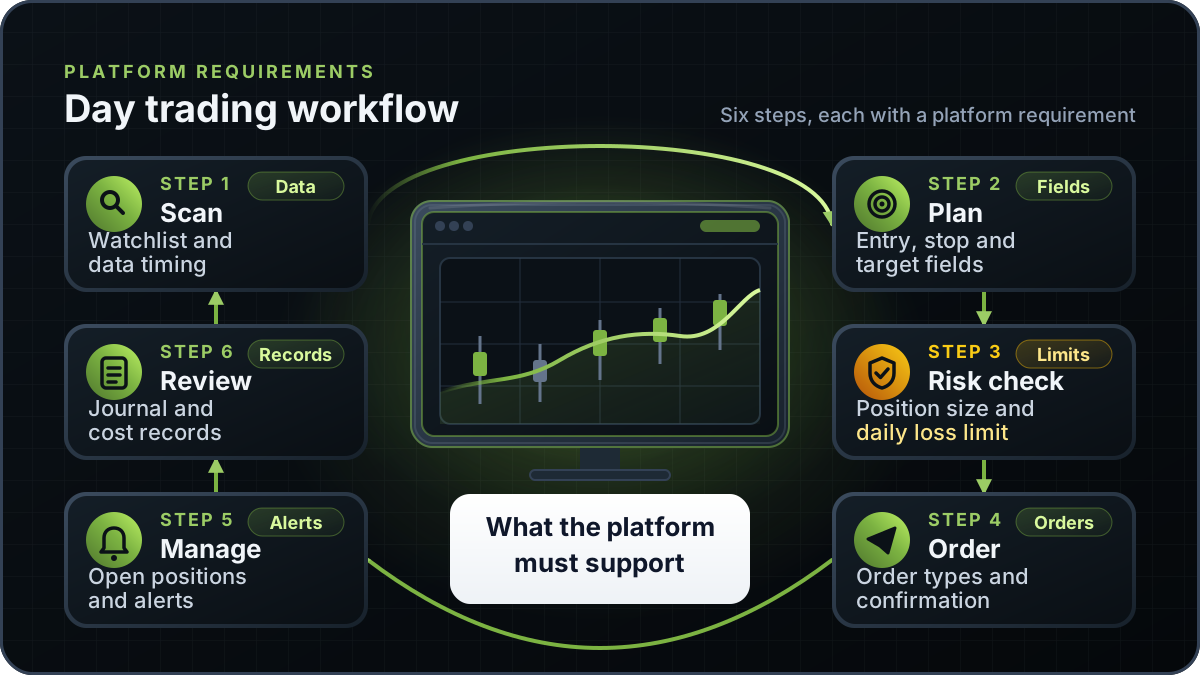
A day trading platform is the software you use to watch markets, plan trades, place orders and manage open positions during one session. The essentials are reliable market data, clear order entry, stop and bracket order types, a live profit-and-loss view, daily loss limits and a stable connection to a regulated broker. No platform makes a trade profitable.
In brief
A checklist for judging a day trading platform under pressure, with a demo test plan, a cost review and the rules where you live.
A platform is judged on what it does when the market moves fast, the connection drops or an order is rejected. Feature lists rarely show that. New to the terms? The trading terminal guide explains the common parts.
| Requirement | Why it matters | How to test it |
|---|---|---|
| Market data timing and entitlement | Delayed or incomplete prices can make an entry or stop look right on screen but fill elsewhere. | Check whether quotes are real-time or delayed for each market you trade. |
| Charting and timeframes | You need the setup and the position on one chart. | Load your symbols, timeframes and indicators, then change timeframe and time the redraw. |
| Order types | Stop, limit, stop-limit and linked orders behave differently when price moves quickly. | Place each order type on a demo account and confirm trigger, fill and cancel behaviour in the log. |
| Order entry speed and confirmations | Slow or unclear entry leads to errors. Confirmation dialogues protect you but can slow fast exits. | Time the path from price to order to confirmation, and check whether one-click trading can be turned off. |
| Position and profit-and-loss view | You need open risk, realised and unrealised result, and average price at a glance. | Open two positions, move price, and check the figures against your own calculation. |
| Risk controls | Daily loss limits, maximum order size and margin warnings limit damage from a bad session. | Trigger a limit on purpose and check how the block is shown. |
| Alerts | Price and indicator alerts let you act on a plan rather than watch every tick. | Set an alert on a demo symbol and confirm it arrives on every device you use. |
| Stability and reconnect behaviour | A platform that freezes or silently drops orders is a larger risk than a slow one. | Disconnect briefly during a session and confirm orders, positions and data are correct on reconnect. |
| Regulated broker connection | Your orders reach a broker licensed and regulated where you live. The platform does not replace that protection. | Confirm the broker's licence on the regulator's own register before you fund the account. |
Test on the hardware, network and markets you actually use.
The table compares common platform types by what their public documentation says, not by which one is best.
| Platform type | What it is | Status and availability |
|---|---|---|
| Broker's own platform | Software supplied with a broker account. Features, data and order types depend on that broker. | Varies by broker. Check the broker's documentation and supported markets. |
| MetaTrader 5 | A retail terminal from MetaQuotes that many brokers offer. Its help describes stop-limit orders. | Offered by brokers that choose to provide it. Our records do not verify an RTX5 integration with MetaTrader 5. |
| cTrader | A trading platform with desktop, web and mobile apps. Its help centre includes an Orders guide. | Offered through brokers that support it. Check the broker list and the order types each broker enables. |
| TradingView with a supported broker | A charting product that places orders with brokers it connects to. TradingView states it is not a broker. | Trading from charts needs a connected, supported broker. TradingView states it works with 100+ verified broker partners. |
| RTX5 | Orrnn's trading terminal and broker-technology product. | Windows desktop client is in preview. Web and mobile clients are planned. A Google Play listing for Android is published, but the mobile client has no approved release record yet. See the product availability record. |
Status reflects the public pages cited in this guide's sources, checked on 7 November 2026. It is not a recommendation.
A market order is sent at the best available price now. A limit order sets the most you will pay or the least you will accept, so it may not fill. A stop order becomes a market order when a stop price is reached.
In the MetaTrader 5 documentation, a buy stop limit order places a buy limit order at the limit price once the ask reaches the stop price. If price moves away from the limit, the order can stay unfilled, so test it before relying on it.
An accepted order can still be routed, cancelled or changed in ways the button does not show. Compare the order log with the broker's statement. See the order management page.
Platform cost is rarely one line. Ask the broker for each charge in writing and compare the total in your account currency.
Illustrative only: if a round trip costs 4 in your account currency and you make 3 round trips a day on 20 trading days, the cost is 240 a month before data fees, spreads and financing.
A platform's risk controls only help if the size of each trade is set before you enter. Decide the loss you accept on one trade, then size the position so a stop at your planned level produces that loss. The position size calculator does this arithmetic.
Illustrative only: on an account of 10,000 in your account currency, risking 1 percent per trade means 100 is at risk. If your stop sits 0.50 per share from entry, the position is 200 shares (100 divided by 0.50). Check the calculator agrees before you use a platform's order size field.
A demo shows how the interface and order types work, but fills, data timing and latency can differ from live trading. Use it to test your workflow and error handling, not to predict profit.
Open a demo account with the platform or broker you are testing. Record the date, instrument, session times and network connection.
Place a market, a limit and a stop order. Read each confirmation before you submit, and check the order log afterwards.
Place a stop-limit order and a linked stop-and-target order. Move price through the trigger and then away from the limit, and record what happens.
If the platform offers a daily loss limit or maximum order size, trigger it on purpose. Check how the block is shown.
Disconnect briefly during a session, then reconnect. Confirm orders, positions and prices are correct, and note how long recovery takes.
Measure click-to-confirmation and price-to-chart delays over several sessions, using your own figures. A scalping app roundup can help you build a shortlist, but it is not a test.
A platform does not change the rules that apply to your account; your regulator and your broker set them, and they change. For the US, the day trading explainer summarises FINRA's 2026 intraday margin change, and the rule text is in FINRA Regulatory Notice 26-10. Before you choose a platform, ask the broker which margin and day-trading terms it applies to your account.
In the UK, the FCA's permanent rules apply from 1 August 2019 and limit retail CFD leverage to between 30:1 and 2:1. In the EU, ESMA introduced leverage limits of 30:1 to 2:1 by asset class for retail CFD clients in 2018 as temporary EU-wide measures, so check your national regulator for the rules that apply today. Read the day trading explainer for the general rules, then check your broker's margin disclosures before you trade on margin.
RTX5 is Orrnn's trading terminal and broker-technology product. Its Windows desktop client is in preview, and the web and mobile clients are planned. A Google Play listing for Android is published, but the mobile client has no approved release record yet; check the product-availability record and release notes before relying on any RTX5 feature. RTX5 is not a broker and does not hold client money. This guide does not rank RTX5 against other platforms, and MetaTrader 5 integration is not verified.
Check RTX5 product availabilityTrust and methodology
We want you to be able to identify who owns the page, inspect the evidence, understand how tools were used, and challenge anything that looks wrong or out of date.
Published under the RTX5 Editorial Team byline. It identifies the responsible publishing organization; it does not imply that a named lawyer, regulator, financial adviser, or licensed expert approved this page.
6 primary references are listed on this page with context about what each one supports. The source set was checked on .
Automation and AI may help organize research, outline a page, or edit language. They are not treated as sources, are not presented as human experts, and do not remove the publisher's responsibility for the final page.
If a statement is incomplete, unsupported, or outdated, send the exact URL, sentence, and supporting evidence through our contact route. Read the full editorial and corrections policy.
Sources were checked on 7 November 2026. They explain market rules and concepts; they do not certify RTX5 or provide individual financial advice.
There is no single best platform for every trader. The right choice depends on your markets, broker, order types, data needs and how stable the software is on your computer. Compare candidates with the same checklist and a demo account. This guide does not rank platforms.
A demo shows how the interface and order types work, but fills, data timing and latency can differ from live trading. Use it to test your workflow and error handling, and record your own timings across several sessions before you rely on the platform.
No. Your regulator and your broker set the rules for your account, whichever platform you use. In the US, FINRA replaced the pattern day trader rule with intraday margin standards in 2026, and brokers may set stricter house rules; the day trading explainer covers the details. Ask your broker for its current margin terms in writing.
Our records do not verify a MetaTrader 5 integration for RTX5, so do not assume one. Check the product availability record and confirm the platform and broker combination with your broker, in writing, before you fund an account. RTX5 is not a broker, so the broker's terms still govern your account.
No. A platform affects how quickly and clearly you can act, not whether a trade makes money. Results depend on strategy, position size, costs, market conditions and discipline. Day trading carries a high risk of loss, and this page is educational rather than individual advice.