Accountable publisher
Published under the RTX5 Editorial Team byline. It identifies the responsible publishing organization; it does not imply that a named lawyer, regulator, financial adviser, or licensed expert approved this page.
Trading glossary
A take profit order, or TP, is an instruction to close an open position once price reaches a target you set. On a long position the target sits above the entry, and on a short position below it. A TP aims to lock in a gain, but the closing price can differ from the target.
In brief
A take profit order, or TP, is set to lock in a gain at a target price. Here is how it works on a long and a short trade, how the arithmetic reads in US dollars, and why it belongs next to a stop loss.
A take profit order, usually shortened to TP, is an instruction to close a position when the market reaches a price you chose in advance. The MetaTrader 5 Basic Principles help says that, besides market and pending orders, "there are special Take Profit and Stop Loss levels". Its Executing Trades help calls them additional orders attached to a position or a pending order that instruct the broker to close a position when the price reaches a certain level.
A take profit sits on the side of the entry where the trade is winning. In the MetaTrader 5 help, a long position's take profit is set above the current Bid and checked against the Bid, and a short position's is set below the current Ask and checked against the Ask. On MetaTrader 5 you set it with a new market or pending order, or add it later by modifying the position. Other platforms may label it differently, so check the order ticket before you confirm.
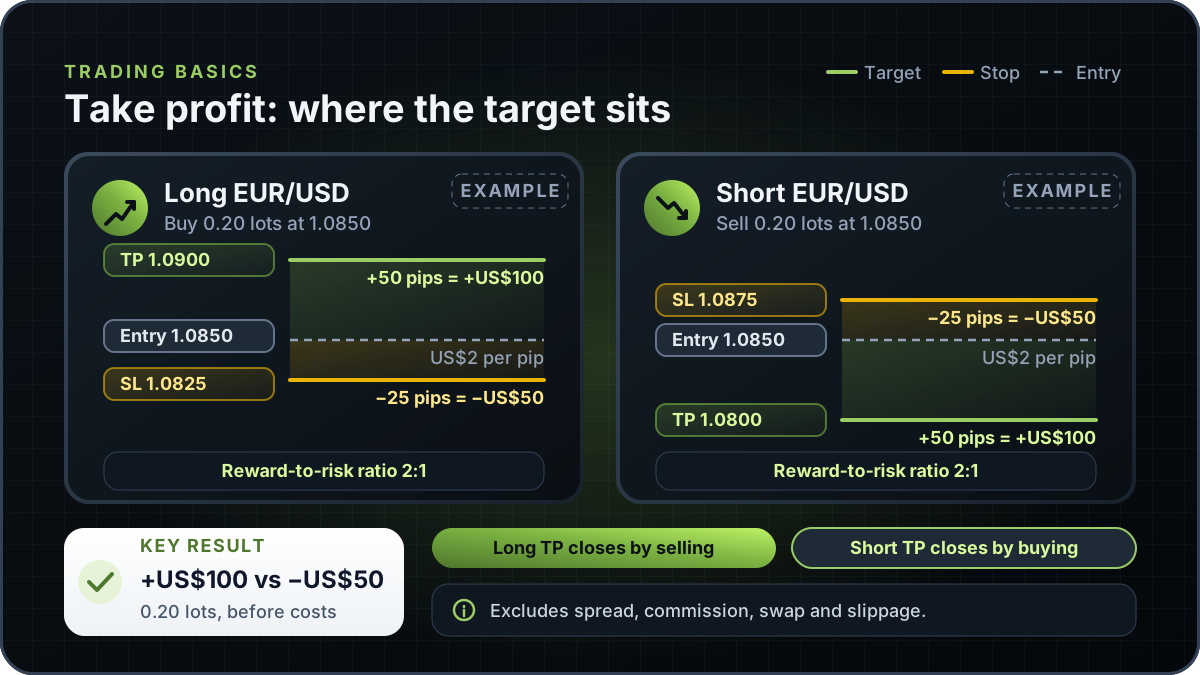
This is an illustrative example, not a recommendation. You buy 0.20 standard lots of EUR/USD at 1.0850. The take profit is at 1.0900, which is 50 pips above entry. The stop loss is at 1.0825, which is 25 pips below.
The arithmetic assumes that 0.20 lots is worth US$2 per pip. This is an assumed figure, not a contract specification, so check the value per pip in your broker's contract specification. At US$2 per pip, the take profit gains 50 x US$2 = US$100. The stop loss costs 25 x US$2 = US$50. On these levels the target pays US$100 against US$50 at risk, a reward-to-risk ratio of 2:1.
These figures leave out spread, commission, swap and slippage, and a fill away from 1.0900 would change them.
Again this is an illustrative example. You sell 0.20 standard lots of EUR/USD at 1.0850. A short profits as the price falls, so the take profit sits below entry at 1.0800, which is 50 pips down. The stop loss sits above entry at 1.0875, which is 25 pips up.
With the same assumed US$2 per pip, the take profit gains 50 x US$2 = US$100. If the price rises to the stop, the loss is 25 x US$2 = US$50. The reward-to-risk ratio is again 2:1, but the direction is reversed. The take profit closes the short by buying. On MetaTrader 5, buying is executed at the Ask price and selling at the Bid price, so the short is closed at the Ask. The stop loss also closes the short by buying.
Confirm the side on the order ticket before you submit it. The stop loss guide shows the matching stop placement for both sides.
A take profit and a stop loss define the planned exits on each side of the entry before the trade runs. On MetaTrader 5 both are levels on the same position, and its help describes modifying a position as changing its Stop Loss and Take Profit levels. It also says that when a position is fully closed, both levels are deleted, because they are associated with an open position and cannot exist without it.
Other platforms may link the two exits in their own way. Before you rely on a pair, check your broker's order documentation for whether the remaining stop is removed when the target fills. MetaTrader 5 also states that stop loss and take profit orders only trigger for open positions, not for pending orders.
Use the risk-reward ratio page to compare the two distances before you enter.
The table compares four order types that often sit together on a trading screen. FINRA's page is written for US stock orders, so confirm how your broker applies its rules in other markets.
| Order | What it does | Price it reacts to | Main trade-off |
|---|---|---|---|
| Take profit (TP) | Closes the entire position when the price reaches the target level (MetaTrader 5) | Long: set above the Bid and checked against it. Short: set below the Ask and checked against it | Ends the trade at the target, so any further move is not captured |
| Stop loss (stop order) | Closes the entire position when the price reaches the loss level (MetaTrader 5) | Long: set below the Bid. Short: set above the Ask | FINRA: once the stop price is reached, the order "automatically turns into a market order" and is executed at the current market price |
| Trailing stop | Moves the stop loss to follow the price as the profit grows (MetaTrader 5) | A distance from the current price that you select | On MetaTrader 5 it runs in the platform, not on the server, so it does not work while the platform is off |
| Limit order | An order to buy or sell at or better than a specified price (FINRA) | A buy limit executes only at or below the limit, a sell limit only at or above it | FINRA: "there's a chance your order doesn't get executed at all" if the market price fails to match or better the limit |
Sources: MetaTrader 5 Basic Principles help (take profit, stop loss and trailing stop rows) and FINRA's investor page on order types, written for US stocks (stop order and limit order mechanics). Verified on 9 November 2026. Check your broker's order documentation for its own rules.
For the entry side of the comparison, see what is a limit order. The order management page covers how orders are handled, and the product availability record shows the status of each RTX5 feature.
On MetaTrader 5, activation of a take profit closes the entire position. For exchange stock and futures symbols, the help says the levels trigger under the exchange's rules, usually when the Last price touches the level, while the resulting buy or sell is still performed at the Bid and Ask prices.
If the closing trade cannot be executed when the take profit activates, for example because the exchange rejects it, MetaTrader 5 does not delete the order. It triggers again at the next tick that meets its conditions, so the closing price may not be the target. FINRA notes that with a market order on stocks "you might not get the price you saw", especially in fast-moving markets.
A partial close works differently. If you close only part of a position, MetaTrader 5 leaves its Stop Loss and Take Profit unchanged, so the remaining volume keeps the same target. Gaps and slippage are covered in the stop loss guide, and partial fills in the limit order guide.
This guide does not recommend a target. One common convention is to place it at a level chosen before the trade, such as a prior swing high or a zone marked on the chart.
Check the target against the stop and the amount you accept to lose. The position size calculator sizes a trade from the stop distance. It does not choose the target for you. A farther target may take longer to reach, and a nearer target may close sooner but cap the gain. A target is a plan, not a forecast of where the price will go.
RTX5 is Orrnn's trading terminal and broker-technology product. Its Windows desktop client is in preview, and the web and mobile clients are planned. A Google Play listing for Android is published, but the mobile client has no approved release record yet. Check the product-availability record before relying on any RTX5 feature. This page does not confirm take profit support in any RTX5 client.
Check RTX5 product availabilityTrust and methodology
We want you to be able to identify who owns the page, inspect the evidence, understand how tools were used, and challenge anything that looks wrong or out of date.
Published under the RTX5 Editorial Team byline. It identifies the responsible publishing organization; it does not imply that a named lawyer, regulator, financial adviser, or licensed expert approved this page.
5 primary references are listed on this page with context about what each one supports. The source set was checked on .
Automation and AI may help organize research, outline a page, or edit language. They are not treated as sources, are not presented as human experts, and do not remove the publisher's responsibility for the final page.
If a statement is incomplete, unsupported, or outdated, send the exact URL, sentence, and supporting evidence through our contact route. Read the full editorial and corrections policy.
Sources were checked on 9 November 2026. They explain market rules and concepts; they do not certify RTX5 or provide individual financial advice.
TP stands for take profit. A take profit order is set at a target price, and when the market reaches it, the position is closed to lock in a gain. The MetaTrader 5 help describes take profit as a level set to lock in profits of the position. On a long the target sits above the entry, and on a short it sits below.
No. A take profit sets a target, not a result. The price may never reach the target, and a stop loss or a manual close can end the trade first. On MetaTrader 5 the closing trade is performed at the Bid or Ask, and a rejected closing trade triggers again at the next tick, so the closing price may differ from the target. Spread, commission and swap still apply.
Setting both defines the planned gain and loss before the trade runs. On MetaTrader 5 both are levels on the same position, and both are deleted when the position fully closes. Other platforms may link the two exits differently, so check that the remaining exit is removed when one fills. This is an educational point, not a recommendation on what to set.
On MetaTrader 5 a take profit is always connected to an open position or a pending order, and its activation closes the entire position. A limit order, in FINRA's description, is an order to buy or sell at or better than a specified price, and it may not be executed at all. On MetaTrader 5, Buy Limit and Sell Limit are pending orders in their own right. Check your platform's documentation for how each behaves.
This page does not confirm take profit support in any RTX5 client. RTX5 is a trading terminal and broker-technology product. Its Windows desktop client is in preview, and the web and mobile clients are planned. A Google Play listing for Android is published, but the mobile client has no approved release record yet. Check the product availability record before you rely on any order feature.