Accountable publisher
Published under the RTX5 Editorial Team byline. It identifies the responsible publishing organization; it does not imply that a named lawyer, regulator, financial adviser, or licensed expert approved this page.
Trading glossary
A limit order is an instruction to buy or sell a security at a specific price or better. A buy limit order can only execute at the limit price or lower, and a sell limit order only at the limit price or higher. Because the price is capped, a limit order may never fill.
In brief
A limit order names the price you accept. Here is how it works for buys and sells, why it may never fill, and how it differs from a market order.
Investor.gov describes a limit order as an order to buy or sell a security at a specific price or better. Its example is an investor who wants to buy shares of ABC stock for no more than US$10. That investor can submit a limit order at US$10, and the order executes only if the price is US$10 or lower. The idea carries over to any market that has a price, from shares to currency pairs, although the rules and order handling depend on the market and your broker.
For background on the market context, read what is trading. Order types are set in the software you trade with, so see what is a trading terminal for how an order ticket is usually laid out.
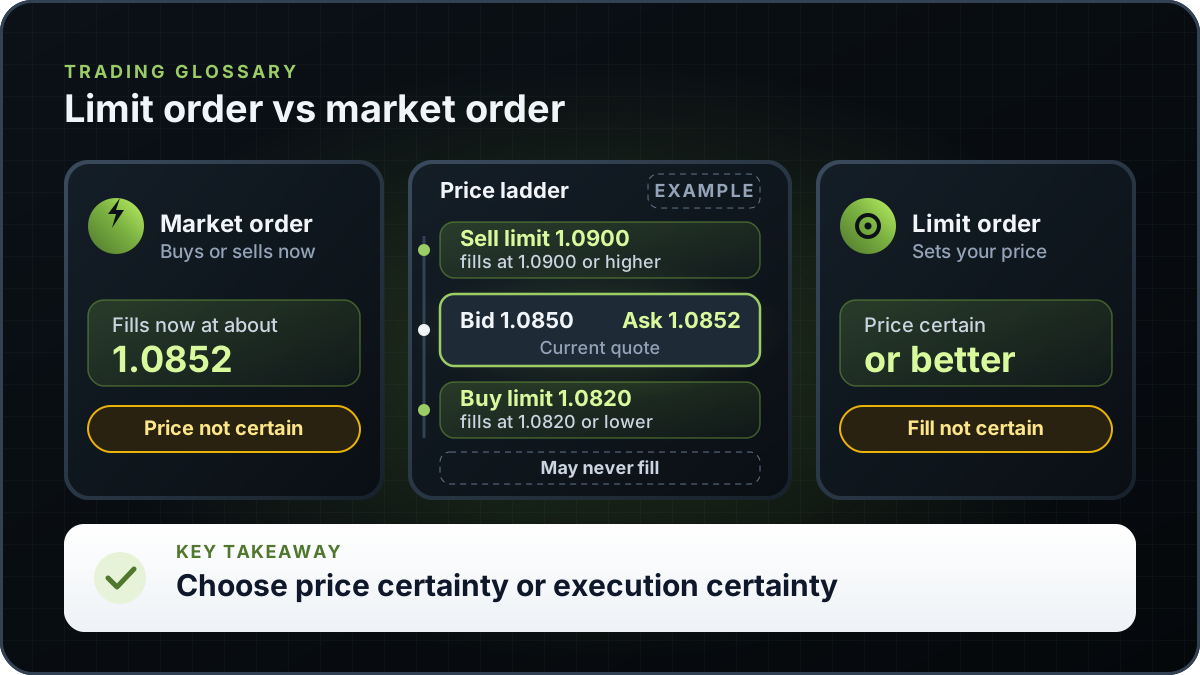
Worked example (illustrative): EUR/USD is quoted at Bid 1.0850 and Ask 1.0852. A buy limit order at 1.0820 sits below the market. It fills only if the market trades down to 1.0820 or lower, so it may never fill if the price keeps rising. A sell limit order at 1.0900 sits above the market. It fills only if the market trades up to 1.0900 or higher.
A market buy placed at the same moment would pay the ask of about 1.0852. The limit order waits for a lower price and gives up immediacy in exchange. For how the bid and ask are set, see bid and ask price.
| Order | Price you set | When it fills | Example result |
|---|---|---|---|
| Buy limit | 1.0820 | Only at 1.0820 or lower | May never fill if the price stays above 1.0820 |
| Sell limit | 1.0900 | Only at 1.0900 or higher | May never fill if the price stays below 1.0900 |
| Market buy | None | Now, at the current ask | About 1.0852 |
Illustrative prices chosen for arithmetic. They are not forecasts or recent market data. Real fills depend on market conditions and your broker.
Investor.gov describes a market order as an order to buy or sell at the current market price. It is almost always executed while there are willing buyers and sellers, but the price you pay can differ from the price you expected. A limit order reverses that trade-off: you control the price, and the trade is not assured.
Short-term traders, including those who use a scalping approach, often weigh this trade-off closely, because a few cents of price can decide whether a fill is worth taking.
| Feature | Limit order | Market order |
|---|---|---|
| Price control | High. Fills at the limit price or better | Low. Fills at the price available when the order reaches the market |
| Execution certainty | Lower. May not fill | Higher while there are willing buyers and sellers |
| Suited to | A trader who will not pay above, or sell below, a set price | A trader who needs the trade done now |
| Main trade-off | The trade may not happen if the price moves away | The price paid may differ from the price expected |
Summarised from Investor.gov definitions of limit and market orders. The table is general and is not a recommendation.
Every limit order has a time setting that tells the broker how long it stays live. For US stock orders, Investor.gov explains that unless an investor specifies a time frame, orders to buy and sell a stock are day orders, meaning they are good only during that trading day. A day order that does not execute during regular trading hours expires, and it does not carry over into after-hours trading or the next regular trading day.
Some brokers also offer good-till-cancelled orders, which stay open until you cancel them or until the broker's own time limit applies. The limit differs from firm to firm, so read your broker's order-type disclosure before you rely on a longer setting.
A partial fill happens when only part of an order trades at your limit price. The rest either stays open or is cancelled, depending on the order's settings and your broker's rules. A partial fill leaves you with a position smaller than the one you planned, so check the size of the trade after each fill.
A limit order may not fill for a few common reasons. The price may never reach your limit, which is the most frequent case. The price may touch your limit while other orders at the same price fill ahead of yours; on many exchanges, orders at the same price are filled in the order they arrived, but priority rules vary by venue. Thin markets can also leave only part of the order filled at that price.
A limit order sets the price at which you are willing to trade. A stop order is entered at a stop price instead. Investor.gov explains that a sell stop order is entered below the current market price, and that investors generally use it to limit a loss or protect a profit on a stock they own. A stop-limit order combines the two ideas: a stop price triggers a limit order. For the stop side in more detail, read what is a stop-loss order.
| Order | What sets it | What it is for | Main limitation |
|---|---|---|---|
| Limit | A limit price | Trading at a set price or better | May never fill |
| Stop | A stop price | Limiting a loss or protecting a profit once the price reaches the stop | Once triggered, the fill can differ from the stop price |
| Stop-limit | A stop price and a limit price | Placing a limit order only after the stop price is reached | The limit may not fill if the price moves past it |
Stop and limit definitions are from Investor.gov. The stop-limit row is a general description and should be checked against your broker's order-type list.
RTX5 is Orrnn's trading terminal and broker-technology product. Its Windows desktop client is in preview, and the web and mobile clients are planned. A Google Play listing for Android is published, but the mobile client has no approved release record yet; check the product-availability record and release notes before relying on any RTX5 feature. The limit-order figures on this page are illustrative and do not come from an RTX5 feature.
Check RTX5 product availabilityTrust and methodology
We want you to be able to identify who owns the page, inspect the evidence, understand how tools were used, and challenge anything that looks wrong or out of date.
Published under the RTX5 Editorial Team byline. It identifies the responsible publishing organization; it does not imply that a named lawyer, regulator, financial adviser, or licensed expert approved this page.
4 primary references are listed on this page with context about what each one supports. The source set was checked on .
Automation and AI may help organize research, outline a page, or edit language. They are not treated as sources, are not presented as human experts, and do not remove the publisher's responsibility for the final page.
If a statement is incomplete, unsupported, or outdated, send the exact URL, sentence, and supporting evidence through our contact route. Read the full editorial and corrections policy.
Sources were checked on 7 November 2026. They explain market rules and concepts; they do not certify RTX5 or provide individual financial advice.
No. A limit order gives you control of the price, but it does not ensure that you trade. A market order is almost always executed while buyers and sellers are present, but the price can differ from the one you expected. Which is better depends on whether price or execution matters more for the trade, your time frame and how liquid the market is. Neither order type removes market risk.
It stays unfilled. A buy limit at 1.0820 on EUR/USD fills only at 1.0820 or lower, so if the market trades between 1.0852 and 1.0900 without reaching 1.0820, the order does not fill. Whether it expires depends on its time setting. For a forex or CFD order, check the expiry options your broker and platform offer. For US stock orders, Investor.gov says an order with no time frame is a day order and expires if it does not execute in regular hours.
No. A limit order sets the price at which you are willing to trade. A sell stop order is entered below the current market and is generally used to limit a loss on a stock you own. Stop orders are a separate order type with their own risks. For the stop side, read the stop-loss guide.
A partial fill is when only part of an order trades at your limit price. The rest stays open or is cancelled, depending on the order's settings and your broker's rules. The result can be a position smaller than planned, so check the open position after each fill. A partial fill does not change the price rule of a limit order.
Yes. A buy limit sets the highest price you will pay, and a sell limit sets the lowest price you will accept. Both wait for the market to reach your price. Whether either order suits a trade is a decision for you and your broker's rules, and this page does not recommend a price or a trade.