Accountable publisher
Published under the RTX5 Editorial Team byline. It identifies the responsible publishing organization; it does not imply that a named lawyer, regulator, financial adviser, or licensed expert approved this page.
Trading alerts
It depends on the app and plan, so no single list holds. In the documentation checked on 10 November 2026, TradingView describes technical alerts on indicator values. The MetaTrader 5 alerts page gives price levels and a news timer as examples and does not mention indicator conditions. For any other app, use the checklist below.
In brief
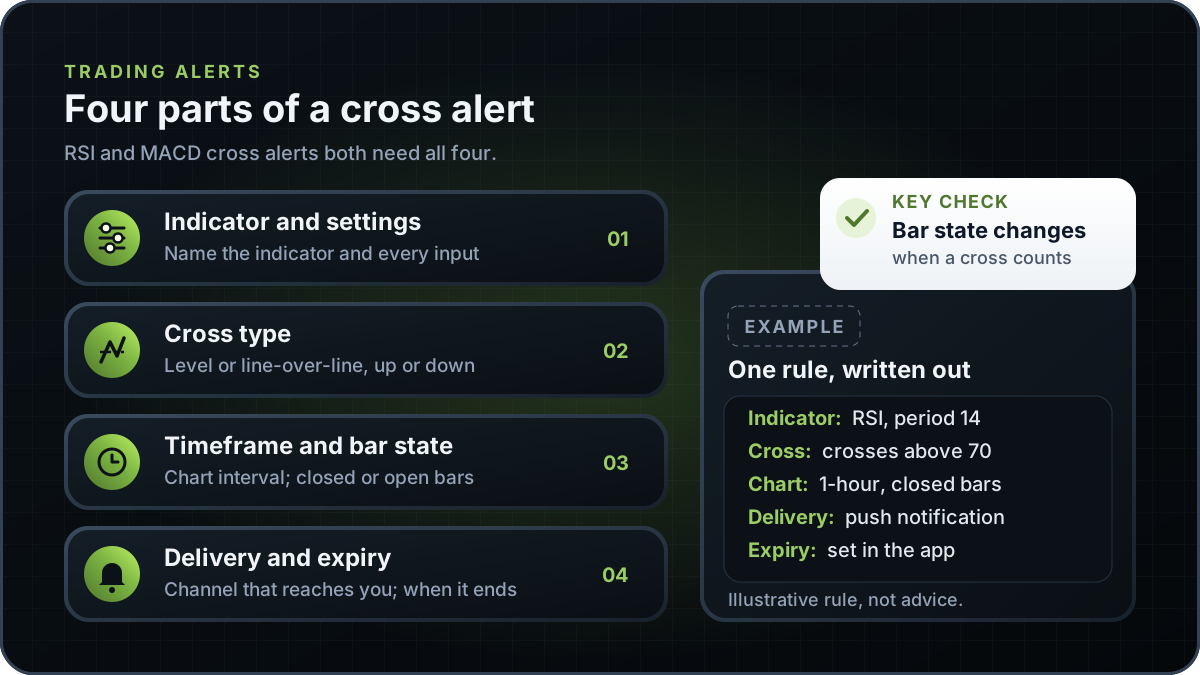
A cross alert tells you when an indicator line crosses a set level or another line. It needs more detail than a price alert, because the same RSI or MACD cross can fire on a different bar depending on how the alert is built.
An alert is a rule that watches a market or account and sends a notification when its condition is met. This guide groups alerts into three broad kinds. The names differ from app to app, so use the groups as a checklist rather than a product list.
TradingView's support article on alerts uses a different grouping: price alerts, technical alerts and watchlist alerts. Its technical alerts cover value changes and custom conditions. The grouping differs, but the same questions apply to each group. For background on the indicators themselves, see the stochastic oscillator.
Name the indicator and every input. Settings change the values, so the alert and the chart must use the same ones. TradingView's article says that if you change an indicator's parameters after creating an alert, 'the alert will still trigger using the original settings'. Check the defaults in the variants table below before you accept them.
For RSI, the cross is usually a value moving above a level such as 70, or below a level such as 30. For MACD, name the MACD line crossing above or below its signal line, and the direction of that cross. Read what is MACD for what the lines show.
TradingView says the interval matters because it 'directly affects indicator calculations'. Bar state is the second half of this step. A cross can appear during a bar that is still forming and then reverse before the bar closes. Check whether your app tests the rule on every price update, once per bar or once per closed bar, using the alert options it shows.
TradingView's article lists app notification, toast notification, email, webhook URL, sound and plain text as delivery methods. It also says the maximum lifetime of a standard alert is two months. MetaTrader 5's alerts page describes sound, email and mobile push notifications. Confirm which channel reaches the device you watch, and whether the alert stops when it expires.
The table uses illustrative RSI readings to show why bar state matters. These numbers are not market data. The rule tests whether RSI crosses above 70.
| Example | Previous closed bar | Current bar | Closed-bar test | Intrabar test |
|---|---|---|---|---|
| Example A | RSI 68.2 | RSI 71.5 at close | Crosses above 70 | Crosses above 70 during the bar |
| Example B | RSI 68.2 | RSI 70.6 during the bar, 69.4 at close | No cross at close | Crosses above 70, then reverses |
Example arithmetic only. In Example A, 68.2 is below 70 and 71.5 is above it on the closed bar. In Example B, the intrabar reading passes 70, but the closed bar finishes at 69.4, below the level.
The same rule can produce an alert in Example B when it is tested during the bar, and no alert when it is tested on the closed bar. Check which test your app runs, because it matters as much as the level. A closed-bar test may give fewer alerts, but each one is tied to a finished bar.
Every default in this guide comes from a named source. Where two references give different values, the table shows both rather than choosing one.
| Item | Reference | What it says | How to read it |
|---|---|---|---|
| RSI period | StockCharts ChartSchool | RSI featured in J. Welles Wilder's 1978 book, New Concepts in Technical Trading Systems; 14 periods is the default | Credits the book, not an introduction date |
| RSI period | MetaTrader 5 help | Says Wilder recommended 14 periods; says 9- and 25-period versions have also gained popularity | No MetaTrader 5 default is stated; check the input |
| RSI levels | StockCharts ChartSchool | Overbought above 70, oversold below 30 | Conventions for describing RSI, not signals |
| RSI levels | MetaTrader 5 help | Mentions 70 and 30; RSI 'usually tops above 70 and bottoms below 30' | Same levels, described without the terms overbought and oversold |
| MACD periods | StockCharts ChartSchool | 12, 26 and 9 periods; signal line is a 9-day EMA | Signal line smoothed with an EMA |
| MACD periods | MetaTrader 5 help | 12, 26 and 9 periods; signal line is a 9-period SMA | Signal smoothing differs from StockCharts |
Verified on 10 November 2026 from the StockCharts ChartSchool and MetaTrader 5 help pages listed under sources.
The table reports what two platforms' own documentation says about alerts on indicator values. It is not a ranking and it is not a list of every app. A page that does not mention a feature is not proof that the platform lacks it.
| Platform | Indicator-value alerts | What the page says | Source |
|---|---|---|---|
| TradingView | Described | Technical alerts cover value changes and custom conditions for drawing tools, Pine indicators and strategies, and chart patterns. They trigger when a value reaches, exceeds or falls below a level. | TradingView support: Introduction to TradingView alerts |
| MetaTrader 5 | Not mentioned on the page checked | Gives Bid and Ask prices passing preset values, and a timer for exchange news releases, as examples of alert conditions. | MetaTrader 5: alerts (trading platform page) |
Checked 10 November 2026. Both pages are listed under sources. Confirm any feature in the plan and version you use.
No app's feature list is treated here as proof of what it offers. Use the questions below on any app's own documentation. The TradingView article is a useful example of the detail to look for, because it covers alert types, indicator settings, the interval effect and expiry.
This guide explains RSI and MACD cross alerts in general and does not describe an RTX5 feature. No RTX5 release record confirms which indicators, chart types or alerts the product includes. Its Windows desktop client is in preview, and the web and mobile clients are planned. A Google Play listing for Android is published, but the mobile client has no approved release record yet; check the product-availability record before relying on any RTX5 feature.
Check RTX5 product availabilityTrust and methodology
We want you to be able to identify who owns the page, inspect the evidence, understand how tools were used, and challenge anything that looks wrong or out of date.
Published under the RTX5 Editorial Team byline. It identifies the responsible publishing organization; it does not imply that a named lawyer, regulator, financial adviser, or licensed expert approved this page.
6 primary references are listed on this page with context about what each one supports. The source set was checked on .
Automation and AI may help organize research, outline a page, or edit language. They are not treated as sources, are not presented as human experts, and do not remove the publisher's responsibility for the final page.
If a statement is incomplete, unsupported, or outdated, send the exact URL, sentence, and supporting evidence through our contact route. Read the full editorial and corrections policy.
Sources were checked on 10 November 2026. They explain market rules and concepts; they do not certify RTX5 or provide individual financial advice.
Not necessarily. Alert features differ between apps and plans. TradingView's documentation describes technical alerts that can use indicator values. The MetaTrader 5 alerts page cited in this guide gives Bid and Ask levels and a news release timer as examples and does not mention indicator conditions, which is not proof either way. Check the current documentation of the app and version you use.
StockCharts gives 14 periods for RSI, with overbought above 70 and oversold below 30, and says J. Welles Wilder featured RSI in his 1978 book. For MACD it gives 12, 26 and 9, and credits Gerald Appel. The sources differ on the signal line: StockCharts uses an EMA, while the MetaTrader 5 page uses an SMA.
A cross can appear during a bar that is still forming and then reverse before the bar closes. Check whether your app lets you choose between open and closed bars and which option is the default, then compare the alert with the chart's closed bars before you rely on the notification.
No. On its own, an alert is a notification that a condition has been met, and it does not place, change or close an order. Protective orders are a separate broker feature. See what is a stop-loss order for how they work, and check which order types your broker accepts.
This guide does not describe an RTX5 feature. No RTX5 release record confirms which indicators, chart types or alerts the product includes. Check the product-availability record before you rely on any RTX5 feature, and treat this page as general education.